macOS · free for private use
dossier
An AI that files your documents.
A macOS app that reads your scans, invoices and letters, gives them proper names and files them into your own folders. It can run fully on your Mac.
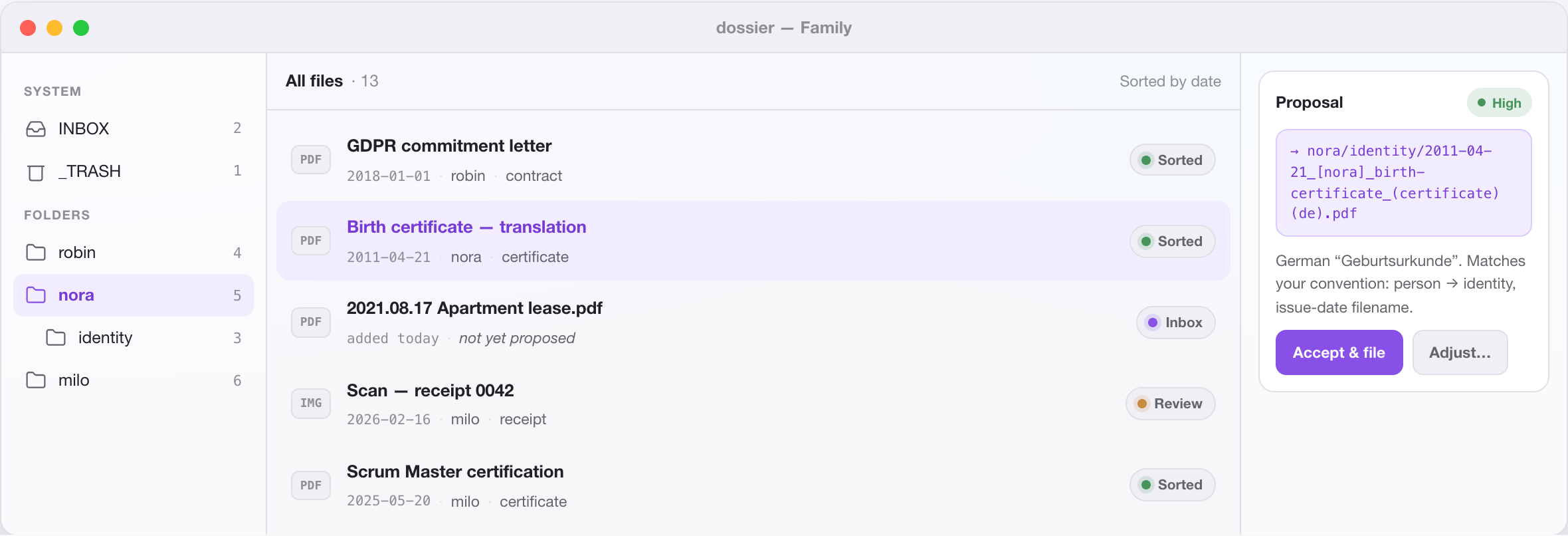
It reads, then files
dossier understands each document’s content, not just its filename, and proposes exactly where it belongs, with a one-line reason and a confidence level. You stay in control of every move.
Your folders, your rules
dossier applies the filing convention you wrote, in plain language, and learns from every correction you make. No import, no lock-in: your files never move out of plain folders on your disk. The example conventions show what one looks like.
Stays on your machine
dossier runs locally. Pick a hosted provider (Claude, OpenAI or OpenRouter) and only what it needs to classify is sent: the file’s path, the first few thousand characters of its text and your note, never the whole document. Pick a local Ollama model and nothing leaves at all. Your choice, every time.
Tame the whole pile
Batch-file a backlog in one pass, review only the uncertain ones in a queue, and search across filenames, AI summaries, your notes and extracted text. Only high-confidence matches are filed automatically; nothing is trashed or overwritten. Thousands of files become a handful of real decisions.
How it works
Point dossier at a folder: your existing document folder, wherever it already lives on disk.
It reads each new file and proposes a target path, with a one-line reason and a confidence level.
You accept, or redirect with a drag, and it learns from the correction, so the next one is better.
Privacy
Plain folders on disk. No proprietary library. Open your files in Finder, exactly as before.
A local catalog. The index lives on your machine. Nothing is uploaded to run the app.
No account required. Download and run. No sign-up, no cloud, no tracking.
Your keys stay yours. API keys for hosted providers are stored in the macOS Keychain, never in the catalog.
Free for private use. For your own documents at home, with the AI you choose.
The details, including exactly what goes to an AI provider: dossier privacy policy.
In the box
Reads 35 file types: PDF, Word and Pages, Excel and Numbers, PowerPoint and Keynote, OpenDocument, images (JPG, PNG, TIFF), e-mails (EML, MSG), EPUB, Markdown, CSV and plain text, plus archives and fonts, filed as assets without being opened.
The AI you choose: Anthropic Claude, OpenAI, OpenRouter, or a local Ollama model. The live model picker shows what your account (or your machine) actually offers.
An assistant with hands: ask in plain language, “find the lease papers and clip them together”. The assistant searches your documents, groups them into paperclips, and answers with links that jump straight to the file.
Paperclips: group related files across folders without moving them: clips you curate, smart clips like Filed This Week and Needs Review, and saved searches that update themselves.
OCR and full-text search: the text of scanned, image-only PDFs is recognised with Apple Vision, on your Mac, not in a cloud (the PDF itself stays unchanged). Search then covers filenames, AI summaries, your notes and the full text of every document.
Quality of life: a watched INBOX that picks up new files by itself, duplicate compare, detachable panels for a second screen, your own date format, trash with restore, and undo where it matters.
Get dossier
Version 0.10.0 · July 5, 2026What's new ↗
Free for private use · macOS 13 Ventura or later · Apple silicon